Rate Limiting
Understanding rate limits
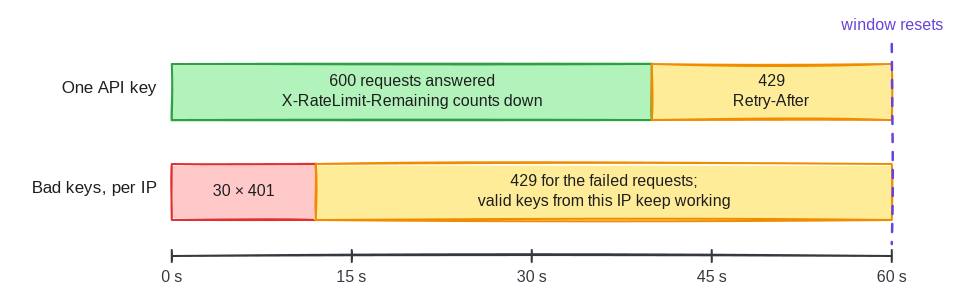
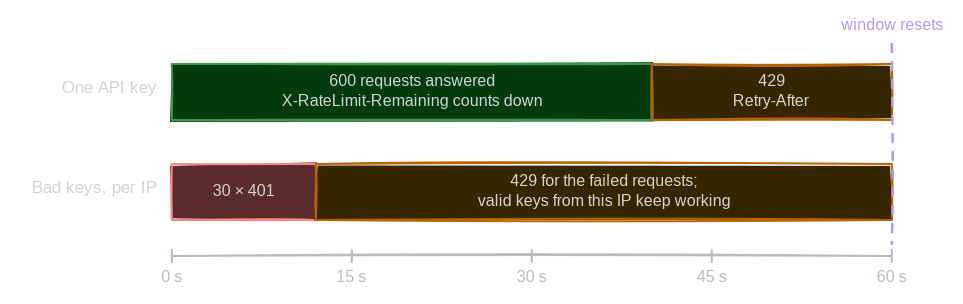
To ensure fair usage and system stability, the API is rate-limited to 600 requests per minute per API key (or, for an app connected over OAuth such as ChatGPT or Claude, per user and workspace), shared by the REST API and the MCP endpoint (/api/v1/mcp), whose responses carry the same headers. Requests without a valid key (missing, invalid, or expired) count against 600 requests per minute per IP address instead, so clients behind a shared address, such as a hosted MCP connector or an office network, don't slow each other down as long as each uses its own key.
Requests with a missing, invalid, or expired API key have a much lower limit: after 30 of them in a minute, an IP address gets 429 Too Many Requests with a Retry-After header (in seconds) instead of 401 for its failed requests for the rest of that minute. Requests with a valid key keep working, so one client's bad key doesn't lock out others behind the same address. Fix the key before retrying. The MCP endpoint doesn't count requests without a key, where MCP clients start signing in with OAuth, or failed OAuth access tokens, which clients refresh.
Understanding Rate Limits
Each API response includes headers to help you track your rate limit status:
X-RateLimit-Limit: Total requests allowed per minute (600)X-RateLimit-Remaining: Requests remaining in the current windowX-RateLimit-Reset: Seconds until the current window resets
Handling Rate Limits
If you exceed the rate limit, you'll receive a 429 Too Many Requests response with a Retry-After header: the seconds to wait before retrying. Here are some best practices:
- Monitor the headers: Check
X-RateLimit-Remainingin your responses - Implement backoff: When you get a 429, wait before retrying
- Cache when possible: Store responses that don't change frequently
- Use pagination efficiently: Request only the data you need
Example of handling rate limits in JavaScript:
async function makeRequest(url) {
  const response = await fetch(url, {
    headers: { Authorization: "Bearer YOUR_API_KEY" },
  });

  if (response.status === 429) {
    // Rate limited - wait and retry
    const waitTime = Number(response.headers.get("Retry-After")) * 1000;
    await new Promise((resolve) => setTimeout(resolve, waitTime));
    return makeRequest(url); // Retry
  }

  return response.json();
}
Last updated on
