Supported diagrams
What each Mermaid diagram type turns into in Excalidraw, with examples.
Flowcharts (including swimlane-beta), sequence, class, ER and state diagrams are converted to Excalidraw elements you can edit. Every other diagram type Pele supports is inserted as a single image.
Nodes keep their size and position from Pele's layout, and labels stay where Pele placed them along arrows. Colors set with style, classDef and class statements carry over.
The examples below are from the package's visual test cases. Open the playground to try your own.
Flowchart
Nodes become rectangles, rounded rectangles ((round) and ([stadium])), ellipses (((circle)) and (((double circle)))) and diamonds ({rhombus}). Other node shapes, such as hexagons, cylinders and parallelograms, become rectangles. Edges become arrows bound to their nodes, with their labels, dotted and thick strokes, and arrowheads. Subgraphs become boxes with their titles, and click links become element links.
flowchart LR
subgraph TOP
direction TB
subgraph B1
    direction RL
    i1 -->f1
end
subgraph B2
    direction BT
    i2 -->f2
end
end
A --> TOP --> B
B1 --> B2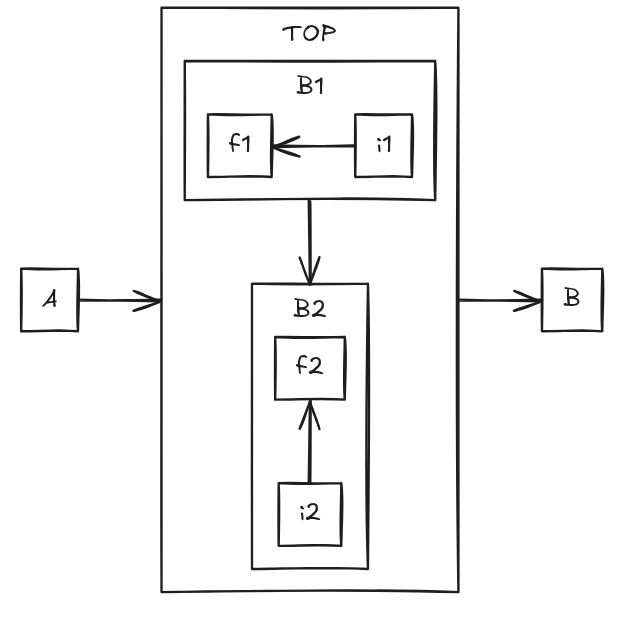
Swimlanes
swimlane-beta diagrams are flowcharts in lanes: each lane becomes a box with its header, and edges become elbow arrows.
swimlane-beta TB
  subgraph Customer [Customer and their very long role description]
    A[Start] --> B[Browse]
  end
  subgraph Sales [Sales team]
    C{Approve?}
  end
  subgraph Warehouse
    D[Ship]
  end
  B --> C
  C -->|yes| D
  C -->|no| A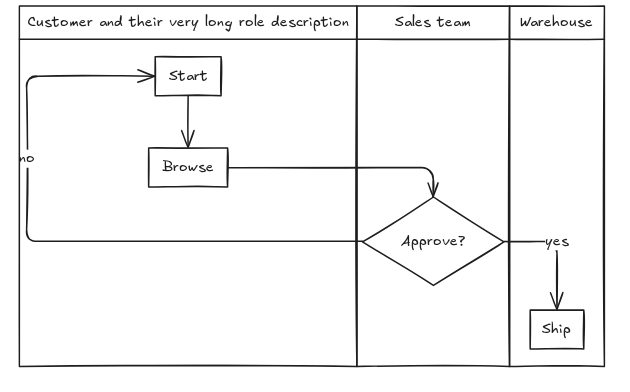
Sequence diagram
Participants and actors, lifelines, messages with their arrowheads, activations, notes, loop, alt, opt, par, critical and break frames, background highlights, groups and sequence numbers are all converted.
sequenceDiagram
  autonumber
  Alice->>John: Hello John, how are you?
  John-->>Alice: Great!
  John->>Bob: How about you?
  Bob-->>John: Jolly good!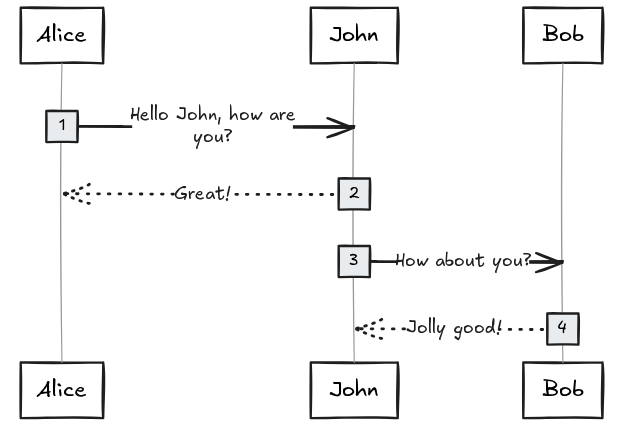
Class diagram
Classes with their members, annotations, generic types, notes, relations with their arrowheads, labels and cardinalities, and namespaces, drawn as titled boxes around their classes.
classDiagram
  class Vehicle {
    +startEngine() void
    +stopEngine() void
  }

  class Car
  class Motorcycle
  class Engine
  class Driver {
    +drive(Vehicle vehicle) void
  }

  Vehicle <|-- Car : Inheritance
  Vehicle <|-- Motorcycle : Inheritance
  Vehicle *-- Engine : Composition
  Driver o-- Vehicle : Aggregation

  note for Vehicle "Base class for all transport types"
  note for Engine "Internal combustion or electric"

  style Vehicle fill:#f9f,stroke:#333,stroke-width:2px
  style Car fill:#bbf,stroke:#333,stroke-width:1px
  style Motorcycle fill:#bbf,stroke:#333,stroke-width:1px
  style Engine fill:#dfd,stroke:#333,stroke-width:1px
  style Driver fill:#ffd,stroke:#333,stroke-width:1px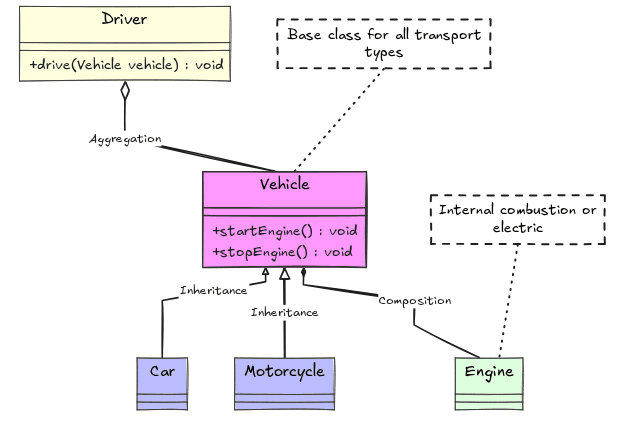
Entity relationship diagram
Entities with their attributes (types, keys and comments), aliases, and relationships with their cardinality markers and labels.
erDiagram
  CAR ||--o{ NAMED-DRIVER : allows
  CAR {
    string registrationNumber PK
    string make
    string model
    string[] parts
  }
  PERSON ||--o{ NAMED-DRIVER : is
  PERSON {
    string driversLicense PK "The license #"
    string(99) firstName "Only 99 characters are allowed"
    string lastName
    string phone UK
    int age
  }
  NAMED-DRIVER {
    string carRegistrationNumber PK, FK
    string driverLicence PK, FK
  }
  MANUFACTURER only one to zero or more CAR : makes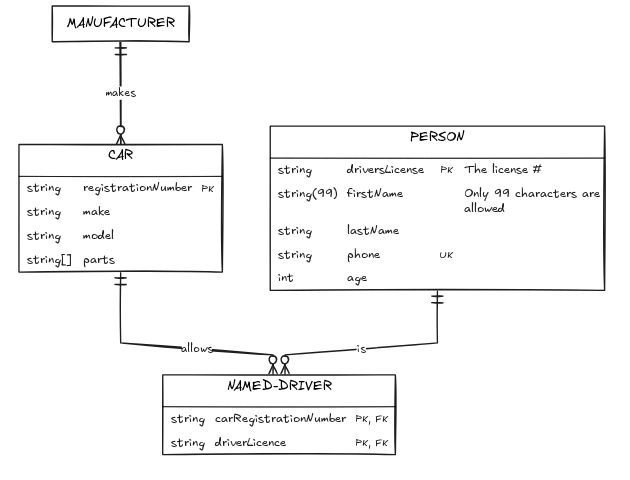
State diagram
States, start and end states, composite (nested) states, concurrent regions, choices, forks and joins, notes, and transitions bound to their states. Transitions become elbow arrows with the elbow option, like flowchart edges.
stateDiagram-v2
    state Decision <<choice>>
    [*] --> Input
    Input --> Decision
    note right of Input: Capture payload
    Decision --> Accept: valid
    Decision --> Reject: invalid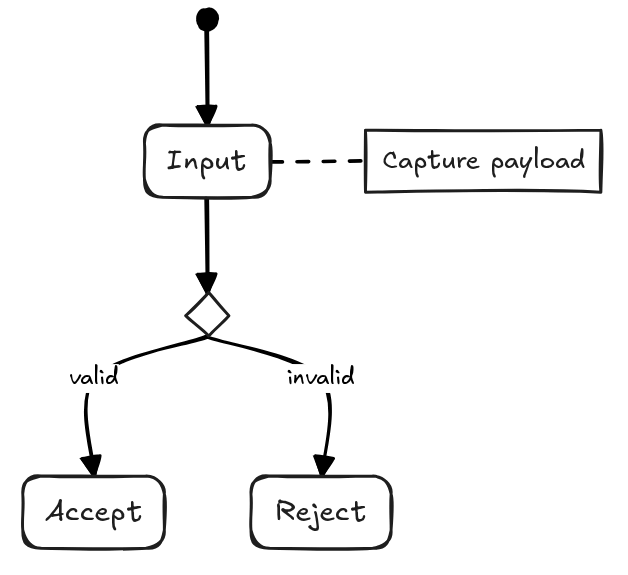
Other diagram types
Diagram types that aren't converted to elements, such as Gantt charts, are drawn by Pele and inserted as an SVG image. parseMermaidToExcalidraw returns the image element in elements and its data in files.
gantt
    title A Gantt Diagram
    dateFormat  YYYY-MM-DD
    section Section
    A task           :a1, 2014-01-01, 30d
    Another task     :after a1  , 20d
    section Another
    Task in sec      :2014-01-12  , 12d
    another task      : 24d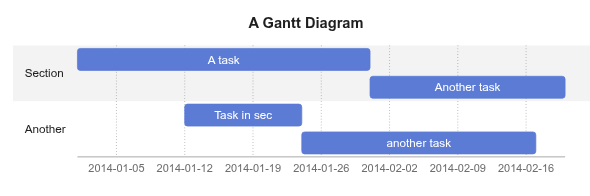
A converted diagram falls back to an image too if converting it fails.
Last updated on
