

Lean Canvas
A visual map for your startup
Build a simple and flexible plan for startup growth. Experiment, improve, and create value for your users.
What is the Lean Canvas model?
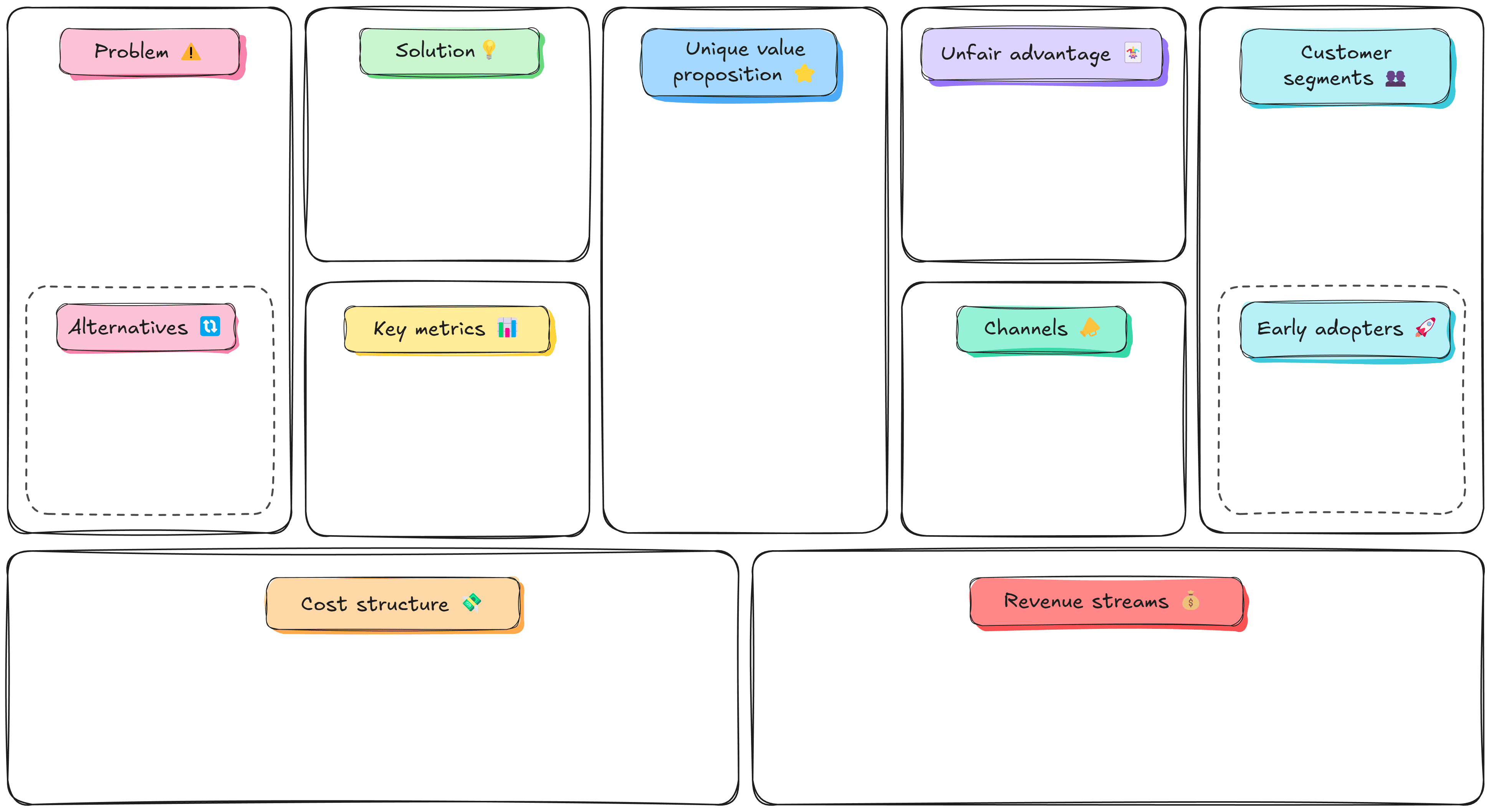
Lean Canvas is a visual planning tool for startups and new businesses that prioritizes fast iterations, learning, and problem-solving. It replaces lengthy business plan documents with a one-page diagram that breaks down your idea into nine key elements, making it easier to spot gaps and validate ideas early.
What's the difference between Lean Canvas and Business Model Canvas?
Lean Canvas is an adaptation of the Business Model Canvas, updated to meet the needs of the lean methodology. While both use a similar 9-box layout, they're different in what they cover and what they're used for.
Business Model Canvas is a planning framework for mature companies. It takes a broader, strategic view by focusing on areas like partnerships, customer relationships, and operational infrastructure.
Lean Canvas was created with startups and lean businesses in mind. The framework shifts focus to early product validation, customer needs, and quick iterations, helping new companies outline key user pain points, sketch simple MVPs, and identify risks before investing in full development.
What are the components of the Lean Canvas?
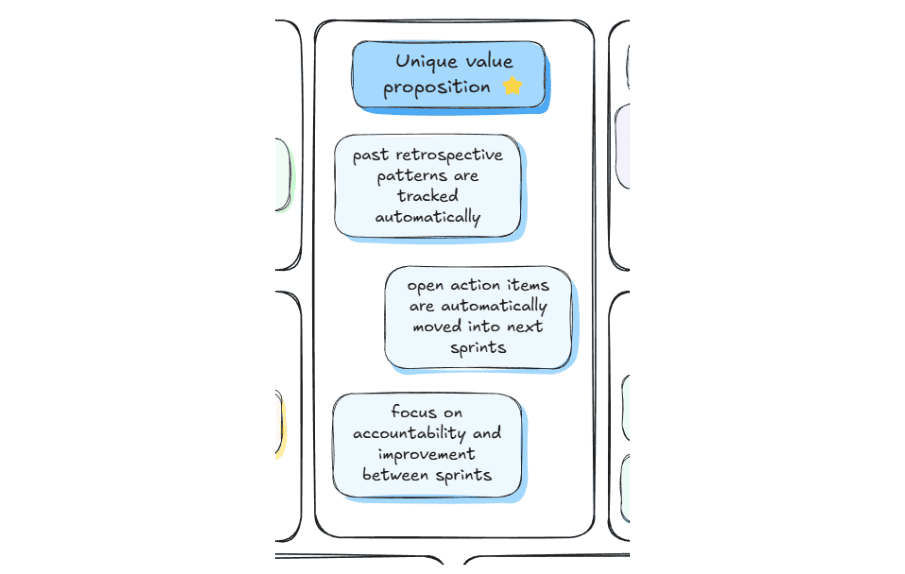
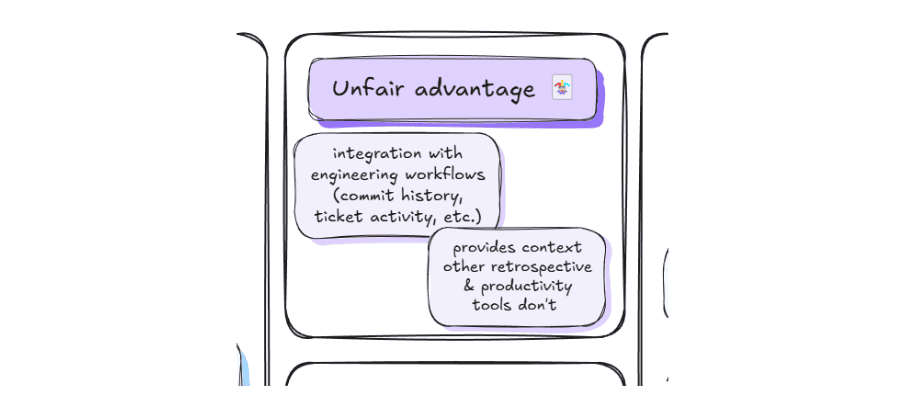
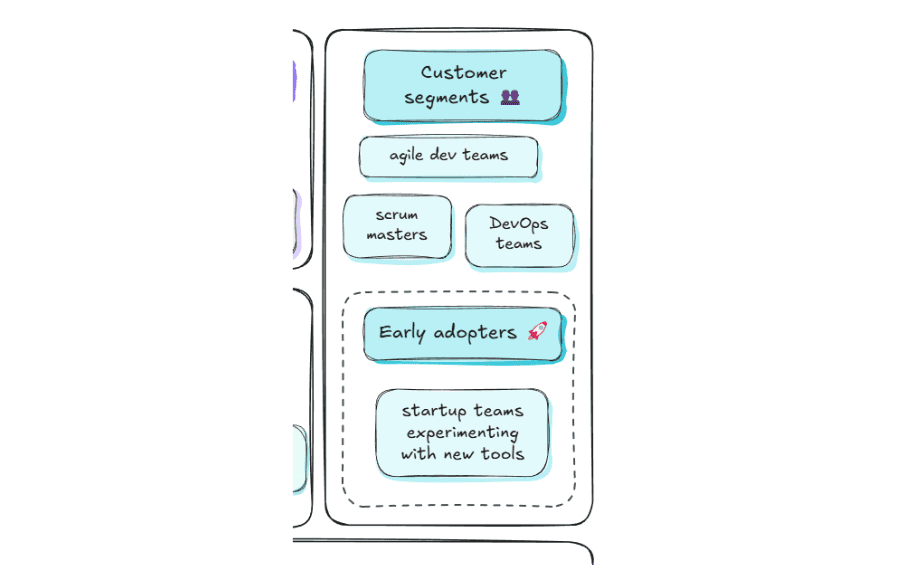
Imagine you're building an app for capturing and managing sprint retrospectives. The product is still in its early days, and you're looking for ways to understand your customers and refine your concept.What would a Lean Canvas for this product look like, and what should it include?
-1.png)
Problem
This section captures the main challenges your target users face: what’s not working, what’s inefficient, or what’s missing from their current workflow.
Where to start?
Use existing knowledge and validate your assumptions through user interviews and research. Review competitors' products to see what problems they try to address. Then, list the top three challenges your target users face, and focus on solving them.
.png)
Solution
This box outlines answers to the challenges identified in the Problem box. Think of it as your MVP: a simple, fast-to-build set of features that solves core user problems and that you can easily iterate on.
Where to start?
Think about how to solve core problems in a way that would make alternatives unnecessary. Keep it simple − the point is to test and gradually improve your solutions, not to come up with the perfect answers right away.
Unique value proposition
The UVP shows why your product stands out and is worth choosing over alternatives. It should highlight the main benefit and focus on solving users’ key problems.
Where to start?
Ask yourself why users would go for your product and not other options. Connect your UVP to their core problems to give them a good reason to choose it.
Unfair advantage
Your unfair advantage is something competitors can’t copy or buy, like proprietary data, a patented technology, or a strong community. It's a differentiator that will give you an edge over competitors in the long run.
Where to start?
Your unfair advantage may not be apparent at first, but it should become clear as you refine your concept. If the project is still in the early stage, come up with a promising advantage for now, while keeping in mind that it will likely change.
Customer segments
Here, you list the specific user groups your product is built for. You can have several segments as long as their needs correspond with your product and the problems it solves.
Where to start?
Use existing data and your own experience to define core target users and learn more as your product evolves. Make sure to identify early adopters—these curious, engaged users are a great source of feedback for new features and updates.
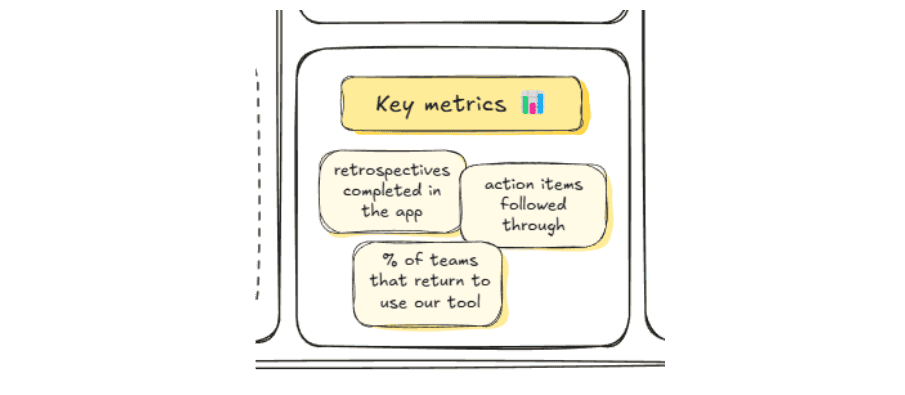
Key metrics
This section shows whether your product is delivering value. Effective metrics are simple, actionable, and tied directly to the problems your product aims to solve.
Where to start?
Focus on numbers connected to user behavior and business performance, like customer lifetime value, retention, or specific feature usage. Update the list to keep metrics relevant. Avoid vanity metrics that don't reflect your product's success, like social media followers or likes.
.png)
Channels
The channels box covers the paths through which you reach and engage target users. They include marketing, distribution, and communication methods like newsletters, social media, live events, print ads, and more.
Where to start?
Trying to cover all channels available can do more harm than good. Your resources are likely limited, so allocate them wisely by focusing on channels most relevant to your target audiences.
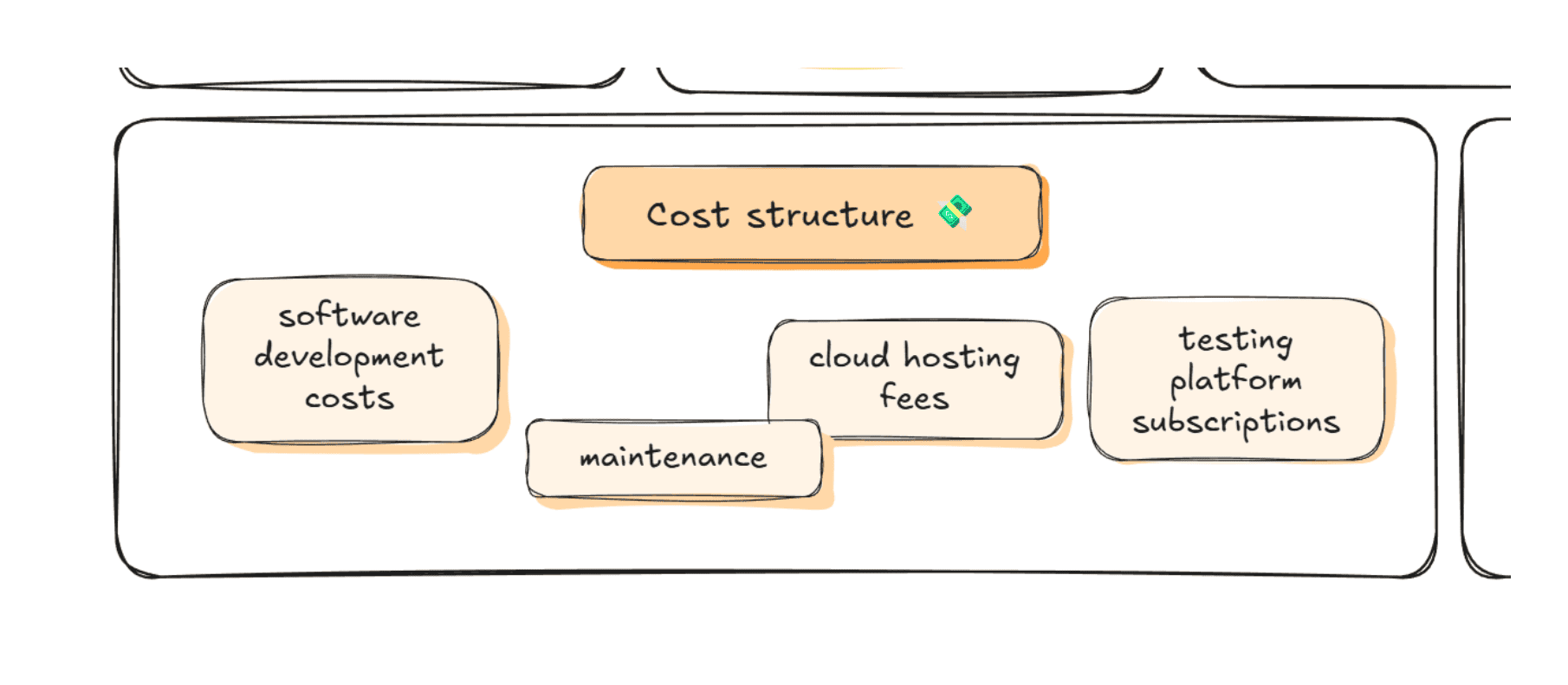
Cost structure
Cost structure outlines the expenses required to build, deliver, and maintain your product, helping you understand how feasible and scalable it is.
Where to start?
Take your time to list both fixed and variable costs, like salaries, software subscriptions, or marketing. Doing so will help you spot potential savings and use resources where they will make the most difference.
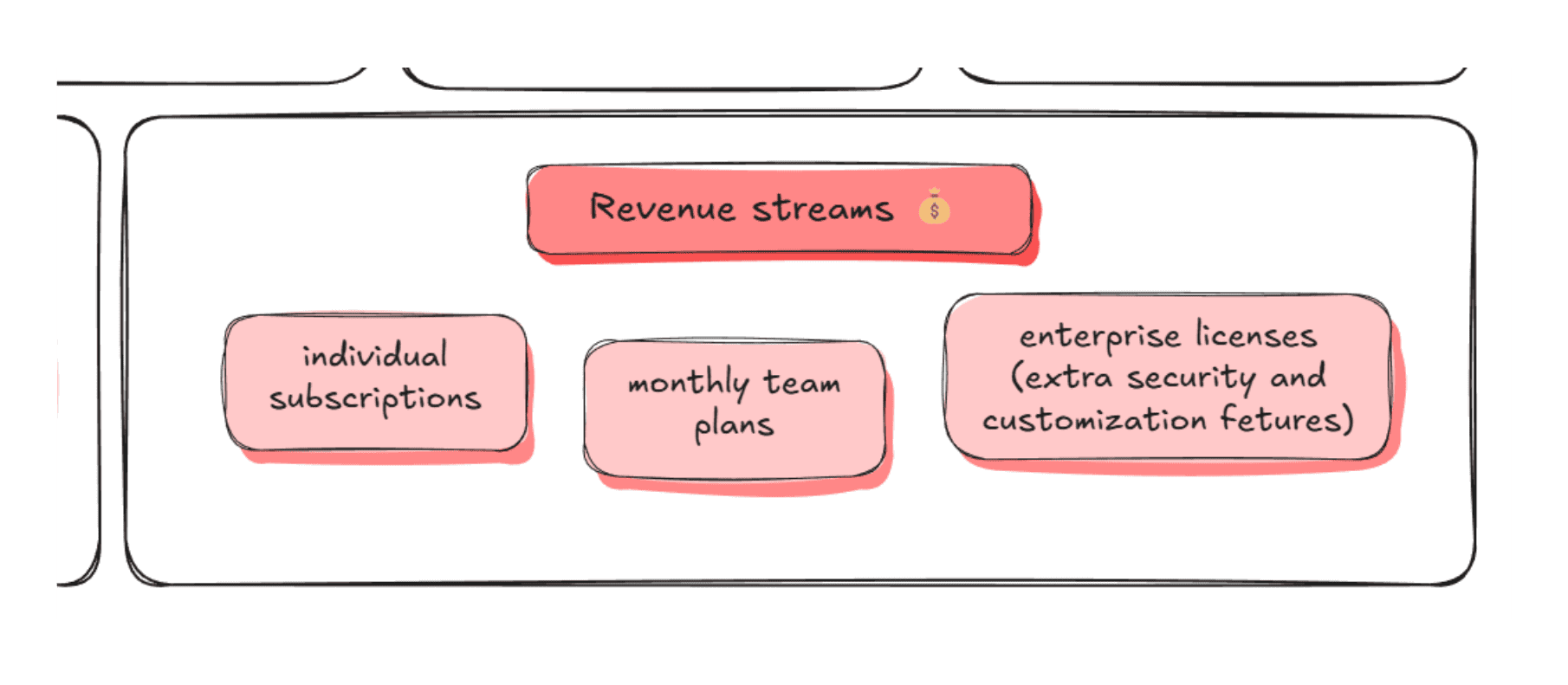
Revenue streams
Revenue streams explain how your product makes money. They should match what customers value.
Where to start?
Similar to cost structure, consider different sources of revenue: one-time payments, subscriptions, usage-based pricing, in-app ads, sponsorships, and more.
How can specific professions use Lean Canvas?
Founders
Plan early-stage growth with a focused but flexible direction. Map your users, problem, and solution to connect customer segments with value propositions, run quick experiments, and avoid building features no one needs.
Business Analysts
Map the customer, core problem, and potential revenue on one page to evaluate whether a product concept is worth pursuing. Quickly compare feature ideas by noting each idea’s costs and target users.
Marketers
Build and test your marketing strategies before launch. Outline a new campaign by defining core users, their primary pain point, and the value proposition your messaging must highlight. Pick the right channels to reach your audience.
Product Managers
Validate product ideas before creating a roadmap. Map new features by identifying the target users, the specific problem to solve, and the value proposition. Outline and discuss assumptions around feature adoption, effort, and impact.
Tips and tricks for creating Lean Canvas
Best practices for Lean Canvas
- Use real customer insights: Base each section on actual interviews or feedback instead of guessing. For example, check if any pain points were mentioned on recent user calls.
- Keep the canvas updated: Adjust Lean Canvas as you learn, especially after tests or significant product updates. For example, user feedback may reveal a whole new segment worth targeting.
- Identify early adopters: Focus on finding users eager to try new features. Try asking the most active beta testers or community members for feedback to validate ideas faster.
- Use bullet points or keywords: Lean Canvas works best when it stays easy to scan and quick to iterate. For example, list specific channels instead of writing a full paragraph about reaching your audiences.
- Limit session time: Set a time frame, e.g., 30 minutes, to avoid overthinking and keep the progress going.
How to create Lean Canvas in Excalidraw
- Add context: Insert links to statistical studies, other scenes, and external sources using the Cmd/Ctrl+K shortcut.
- Differentiate early adopters: While important, early adopters usually aren't representative of your general audience. Create a subsection dedicated to them in the Customer Segments box to keep that distinction clear.
- List alternatives: Similarly, add a subsection in the Problems box for the tools users might choose instead to stay aware of what you’re competing with.
- Use personas: Build and update clear user personas for each customer segment. Refer back to them when creating your Lean Canvas to maintain a user-first focus.
- Create with libraries and templates: Browse Excalidraw libraries for shapes and components, or open a new scene with an editable Lean Canvas template to create a visual plan for your business. Note: The scene opens in the free editor. You'll be able to save or export your current work before loading the scene.

Wrapping up
Lean Canvas is a fast and flexible tool that allows startups to plan their roadmap with a focus on providing value to users. It helps you break everything down onto one page so you can see what matters most—users, their problems, your solution, and the risks to watch out for.
Using Lean Canvas keeps everyone on the same page and grounds decision-making in reality. As you iterate, it helps you validate ideas quickly, compare options, and move from concepts to actionable plans.


Business use or teamwork? Try PLUS features
💬 Comments: Get everyone involved in the teamwork and facilitate feedback sharing.
🎙️ Voice hangouts and screenshare: Discuss and collaborate on your Lean Canvas without the need for extra tools.
📺 Presentations: Show your Lean Canvas in meetings by turning whiteboards into slides with just a few clicks.
😎 Unlimited scenes: Create dedicated scenes for user personas, brainstorming, and other resources that support your planning.
📂 Work organization: Manage and simplify teamwork using scene collections, user accounts, access controls, and team workspaces.
Sources and further reading
Curious to learn more about Lean Canvas and Business Model Canvas? Check out the resources below, where creators of both frameworks go in-depth on their purpose and use.
Ash Maurya – Running Lean
Authored by the creator of the Lean Canvas model, the book presents his updated take on the Business Model Canvas adapted for lean businesses and startups.
Alexander Osterwalder, Yves Pigneur − Business Model Generation
A practical handbook for founders, business owners, and innovators that extensively covers the Business Model Canvas method.
