

.svg)
Making technical work clear for everyone
Read how an online whiteboard helps a non-profit foundation build understanding between devs, community, and non-technical teams.
"I can see how somebody who has never used Excalidraw just comes in, starts creating, and explaining stuff to others. This simplicity is what got us in."
Max Kurapov
About Interledger Foundation
Interledger Foundation (ILF) builds payment software and stewards open standards with the goal of creating an accessible and interoperable financial system. The foundation works closely with regulators and institutions to create conditions for these systems to operate and scale in practice.
ILF is a non-profit organization. In line with its mission, the software is open-source and freely available.
- Company URL
- interledger.org
- Field of work
- payment infrastructure software, non-profit, open-source
- Location
- remote across 17 countries
- Company size
- 70+ people
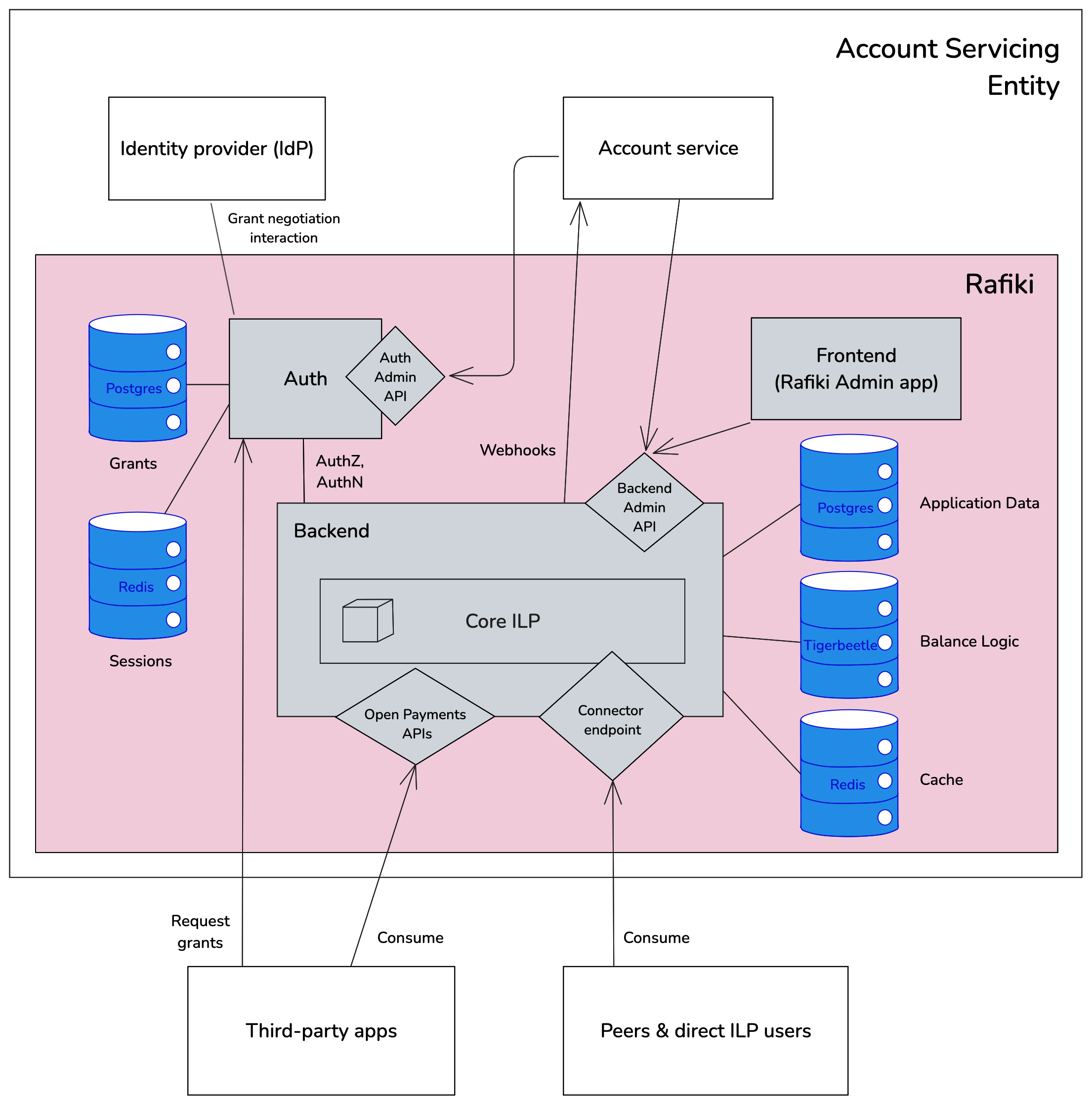
ILF uses Excalidraw to visualize the core architecture of Rafiki, its open-source software built to facilitate integration with the Interledger Protocol.
(source: rafiki.dev)
Why Excalidraw?
High-level payment processes, detailed system architectures, software integration strategies − technical concepts are a key part of daily work at ILF. But so are meetings, presentations, conferences, and collaboration with community contributors and members of financial institutions who aren't always familiar with software engineering.
For a long time, Mermaid has been the primary tool for internal tasks in the tech team. But while it works for devs, it's too specialized for others.
"We use Mermaid a lot. But we also needed something we could use across all teams and our community. A simple tool to share technical knowledge with non-technical people," explains Max Kurapov, engineering manager at ILF.
The team found what they were looking for in Excalidraw − and stayed for good.
Solution
One simple workspace for everyone
"We use Excalidraw throughout our entire diagram creation flow to explain concepts related to our software, how different parties can integrate with it, or how to use it."
Max Kurapov
New projects usually start with a rough sketch on a shared Excalidraw canvas, where the team bounces ideas about system architecture or payment flows. The whiteboard is a single place everyone can return to and collaborate. The editor is simple, so anyone can contribute.
The ability to work asynchronously is particularly important for ILF as a remote-first organization. "I don't have to worry. I can just start making a diagram, and if somebody wants to look at it, they know where to find it when they have the time," says Max.
These brainstorming sketches often turn into valuable technical assets. They're included in documentation, committed to GitHub repositories, or shared in presentations at conferences and meetings with stakeholders outside ILF.
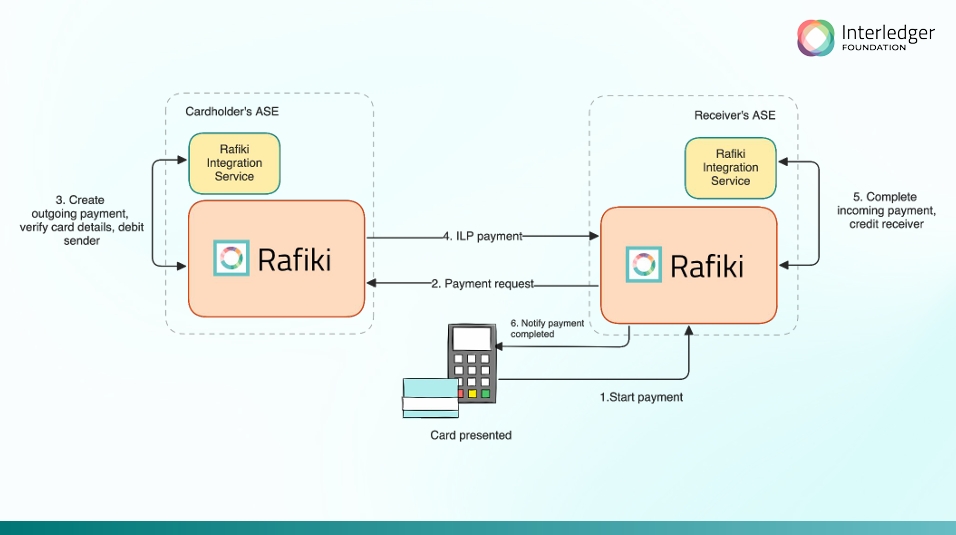
Excalidraw visuals are a staple in ILF's presentations, such as this one on its payment system.
Custom design language
But how do you get from rough drawings to clear, refined designs?
For ILF, the answer is their own design language − custom components saved as an Excalidraw library.
"My team creates a lot of external content and presentations, so at one point we thought it would make sense to standardize our visuals," explains Max. "We just started with one Excalidraw library, and from there people started adding the components to their personal collections."
A unified, color-coded set of objects helps keep visuals consistent, clear, and easy to share between remote teams, community, and partners.
All components are readily available in Excalidraw, so everyone can quickly create diagrams and instantly add them to documentation, GitHub, and presentations. Minimal editing, full clarity.
In Max's own words, "A defined design language is very helpful for getting started with a project. Instead of having to worry about the size of the components, font changes, or tinkering with colors, I can focus entirely on mapping out the concepts I want to convey, knowing the final result will be ready to share."
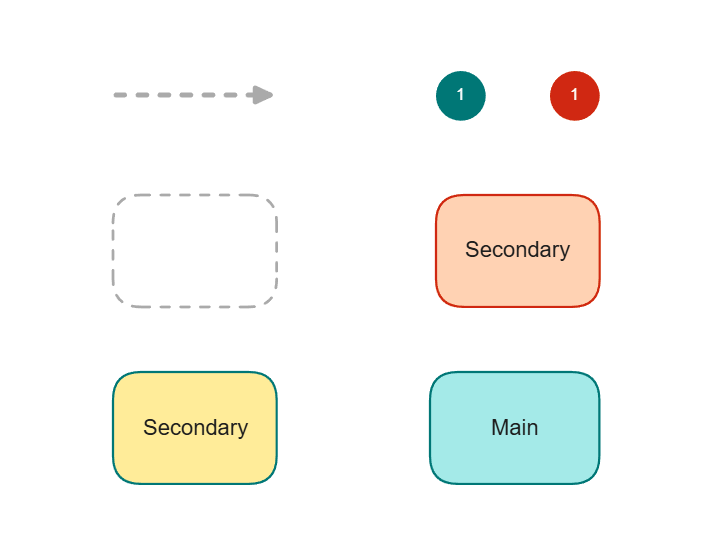
Custom components saved in Excalidraw libraries help ILF create clear and consistent slides quickly.
Onboarding
"Excalidraw is also one of the first tools I reach for during onboarding sessions," adds Max.
When a new hire joins the tech team, the introduction starts with an empty whiteboard. During a meeting, a senior colleague draws diagrams, gradually adding complexity and answering questions to explain concepts or architecture at an accessible pace.
At the end of the session, the new team member has a visual overview of the system or process, built up piece-by-piece without having to go through tons of documentation on their first day.
"We could just share a bunch of repositories and documentation with new colleagues, but that would get overwhelming pretty fast. Instead, they get a person who can just sit down with them and start from a blank canvas, dragging boxes around. I think that building together is just a nicer way to do it," explains Max.
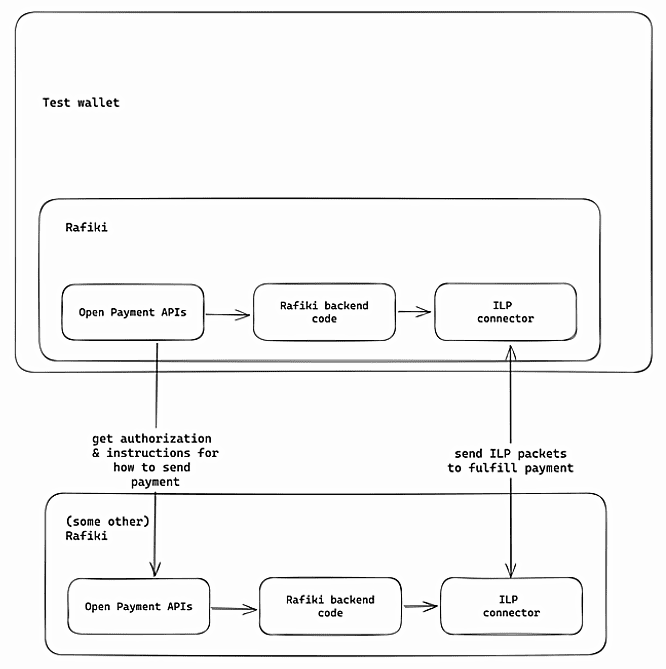
By building diagrams together with senior colleagues, new hires learn how ILF software works by practice, not theory.
Result
From complex ideas to shared understanding
"With Excalidraw, it's very easy to just get started. When you first use most other visual tools, you see a lot of different options, and you are instantly overwhelmed, especially if you don't have any experience."
Max Kurapov
When projects bring together technical and non-technical users, you need a simple tool that feels familiar from the start. With Excalidraw, anyone at ILF can create visuals that everyone understands, making collaboration smoother across teams.
🤝 Easier teamwork: Ideas and diagrams are shared in a single space accessible to anyone in ILF, supporting remote, asynchronous teamwork.
✍️ Instant adoption: With a simple editor, anyone can join the work right away, no matter if they draw diagrams every day or are a first-time user.
📝 Clear documentation: Excalidraw visuals help ILF illustrate system architecture, features, and processes clearly, so they can be shared with the community and financial institutions.
✅ Consistency: The tech team creates all external material in the same visual tool and follows a unified design language. As a result, diagrams and presentations are easy to understand and instantly ready to share.
🎓 Engaging onboarding: Instead of spending hours reading documentation, new hires can take a more hands-on approach, exploring and building visual system structures with more experienced colleagues.
)
The highest praise? Seeing a client use your product to demo theirs. Thanks!
Your turn to draw
Take visual notes, build software structures, create consistent visuals, and brainstorm for faster collaboration and clarity. With a simple layout, hand-drawn feel, and essential features, everyone can contribute right away.
Give it a try in our free open-source editor, or sign up for a 14-day Excalidraw Plus trial to turn drawings into presentations, add comments, manage your team space, create with extended AI, and explore more teamwork features.


