


From ideas to features with a shared visual workspace
Here's how an online whiteboard helps build open-source geodata software, one iteration at a time.
"Whenever we want to quickly create shareable notes or sketch something, we usually go to Excalidraw. It's just so fast and simple."
Tomaš Mizera
About Mergin Maps
Mergin Maps is a mobile QGIS app built to enable easier access, collection, and sharing of geodata in the field. The software replaces traditional, less efficient methods used by surveyors and analysts in infrastructure, public services, farming, and other industries that depend on accurate geospatial records.
Mergin Maps is a part of Lutra Consulting, a QGIS consultancy and software development company, and an important contributor to the open-source geodata community.
- Company URL
- merginmaps.com
- Field of work
- geospatial software, QGIS, open-source
- Location
- UK
- Company size
- 30+ people
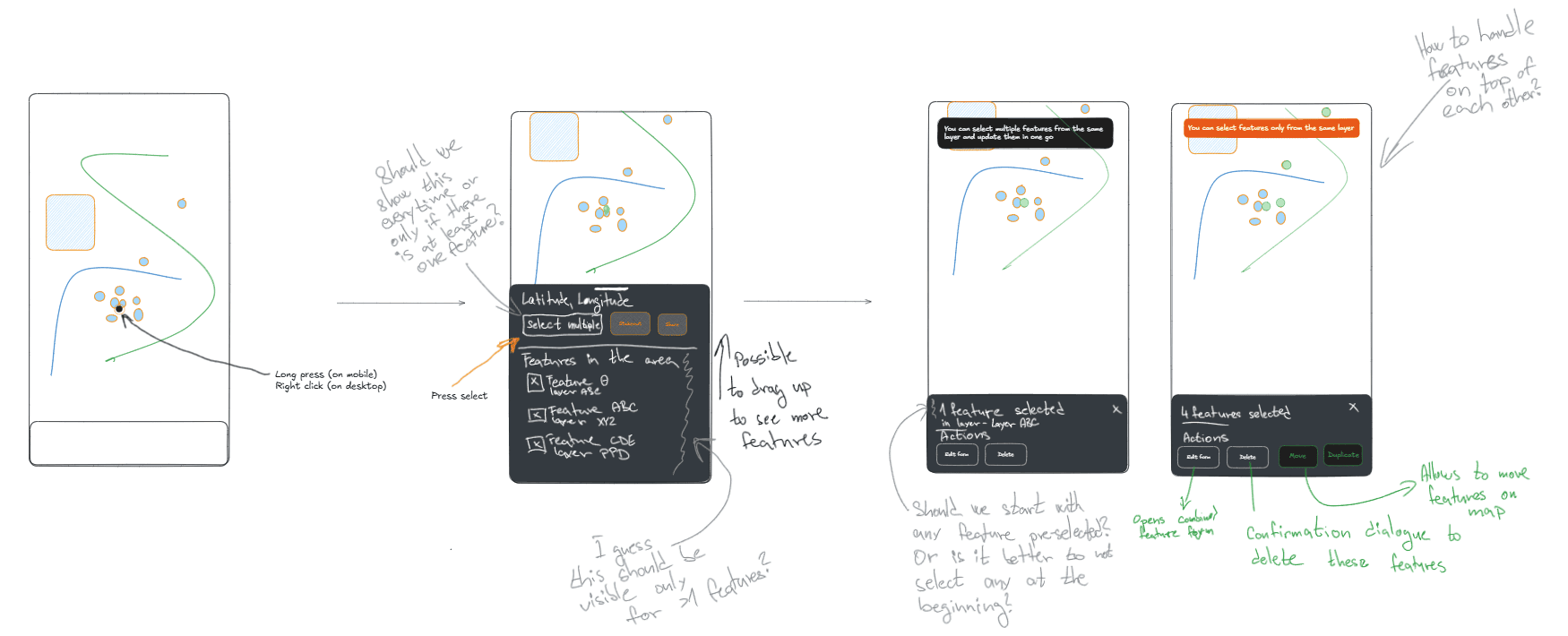
Most new features start as visual notes and rough whiteboard sketches.
Challenge
The need for simpler, unified teamwork
Prototyping, diagramming, and cross-team collaboration are at the heart of daily work at Mergin Maps. Before Excalidraw, the team relied on multiple tools for all these tasks.
"Honestly, I hardly remember what we did before because we've been using it for so long. I think it was a combination of Google Docs, Figma, and markdowns all over GitHub," admits Tomaš Mizera, product manager at Mergin Maps.
- As a result, visuals and notes were scattered across several locations and formats, adding friction to the teamwork.
- While Figma works great for high-fidelity designs, it's not fast enough when it comes to early sketches and collaboration. "It's just too much for most people, especially developers," adds Tomaš.
Why Excalidraw?
The idea to start using Excalidraw came from within – Mergin Maps' CTO.
"As our QGIS development lead, he uses Excalidraw for a whole bunch of things, like software architecture or documentation. About four years ago, he introduced our team to the tool, and we've been using it ever since," says Tomaš.
Other tools remain in use, but Excalidraw replaced them where speed and flexibility matter the most.
Solution
A central workspace for ideas, planning, and execution
"We really like Excalidraw for what it is: a quick sketching tool that makes iteration and sharing work easy."
Tomaš Mizera
Excalidraw fits perfectly into Mergin Maps' iterative workflow, helping teams collaborate throughout most stages of product development.
Brainstorming
Most Mergin Maps projects start on a shared brainstorming whiteboard where the team visualizes and discusses ideas.
Wireframes
The team captures concepts as quick wireframes and iterates to refine them before they're shared with designers and developers.
Development tickets
Visuals attached to dev tickets give Mergin Maps developers clear context about new features, updates, and issues to solve.
Diagrams
Developers use Excalidraw to create sequence diagrams, software architecture diagrams, and other technical visualizations.
Work management
By keeping projects on dedicated, regularly updated whiteboards, the team can easily keep track of changes.
Brainstorming and iterative teamwork
Early on in the process, Excalidraw provides a shared space where everyone can contribute their ideas.
"We sketch things on the whiteboard, and then we do a feedback loop where we comment and iterate. Once we find a good solution or an outcome that we agree on, it goes further to the design," explains Tomaš.
The workflow is largely visual. The team usually starts with an inspiration, like a screenshot: "For new features, let's say filtering, we first paste examples into the whiteboard to compare them and see how others do it," he says.
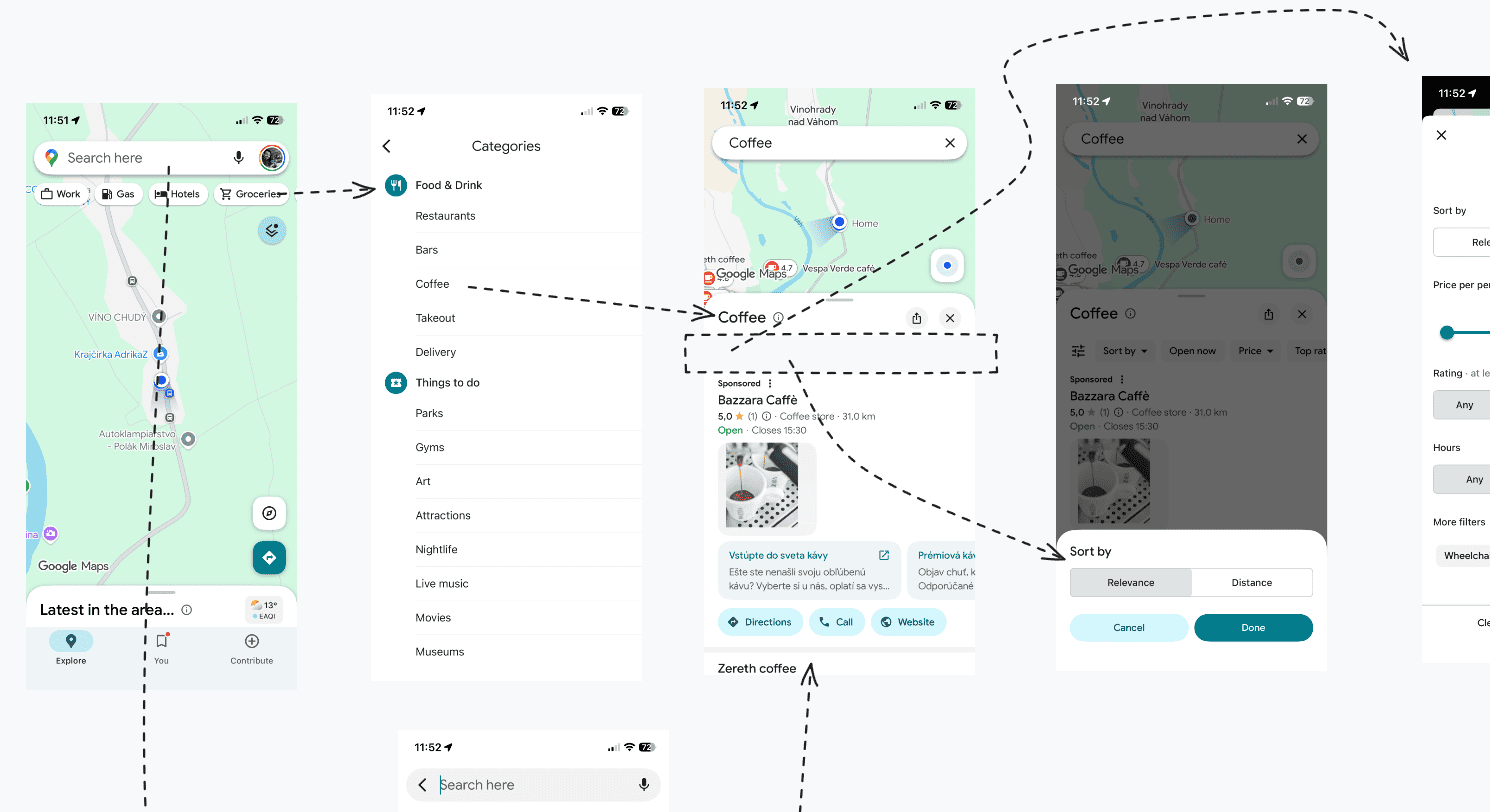
The team uses arrows, comments, and frames to map user flows from other apps.
"Then, we sketch what it could look like in our app," he adds. It's an experimentation stage, where ideas are thrown around and discarded quickly; wireframes are bare-bones, meant only to convey the functionality.
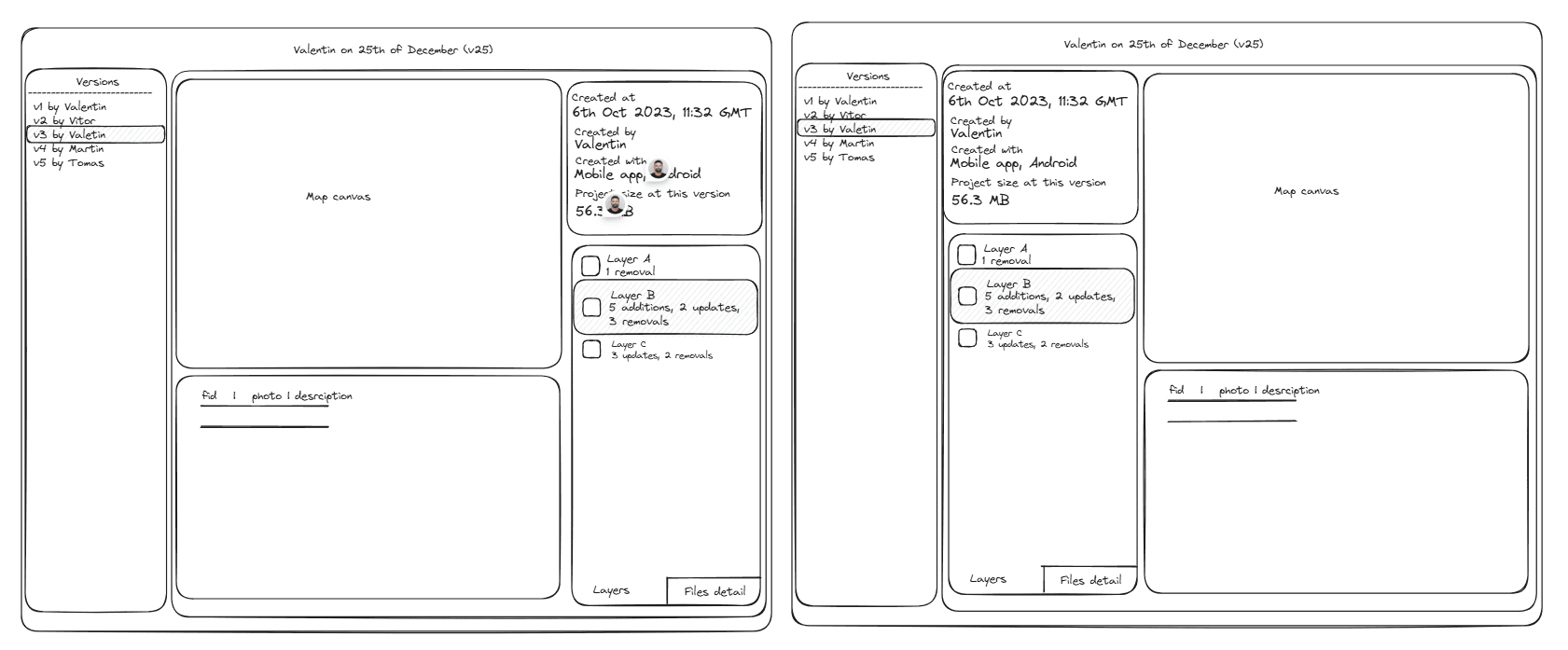
Using simple prototypes, the team can quickly compare different UI layouts.
With each iteration, the team improves the design until they come up with an optimal version. A simple editor keeps the work moving, making it easy to create and update prototypes with a few clicks.
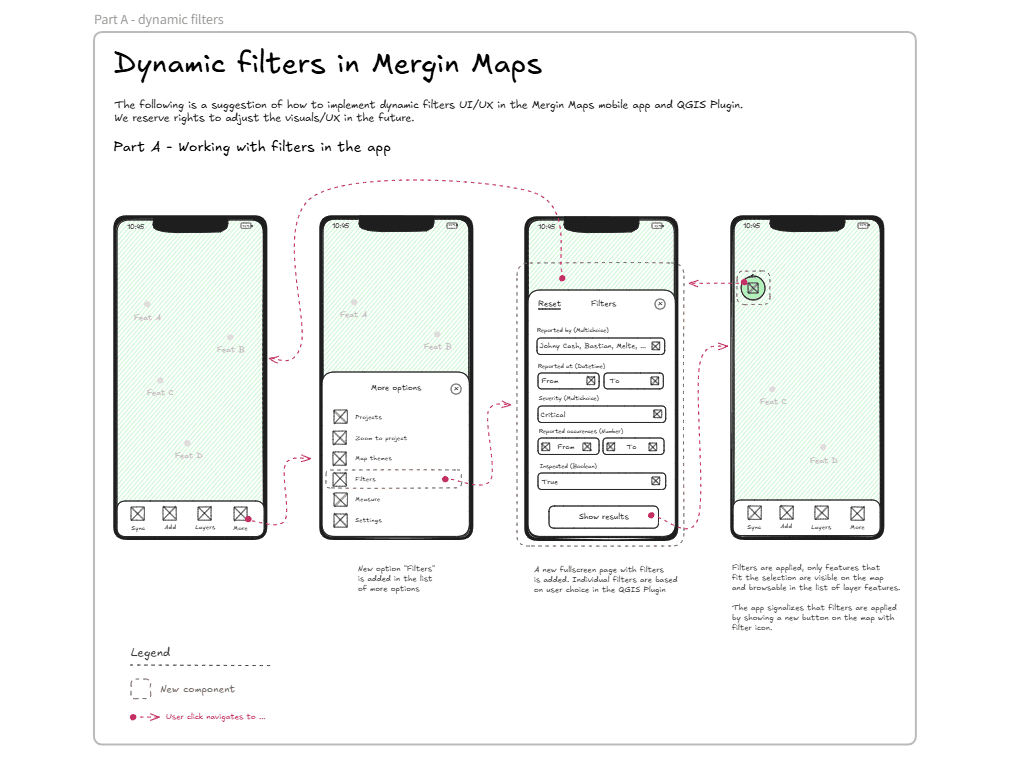
Hi-fi prototypes include information necessary when handing over the work to developers and designers.
Development
Rather than exchanging lengthy messages, the team uses these brainstorming sketches and prototypes to communicate with developers. "I add a link to an Excalidraw whiteboard to most development tickets as one of the resources," says Tomaš.
With a visual reference, developers can immediately understand the idea, then respond by pointing to specific elements or sketching improvements. All within the same shared workspace, to keep the conversation and context intact.
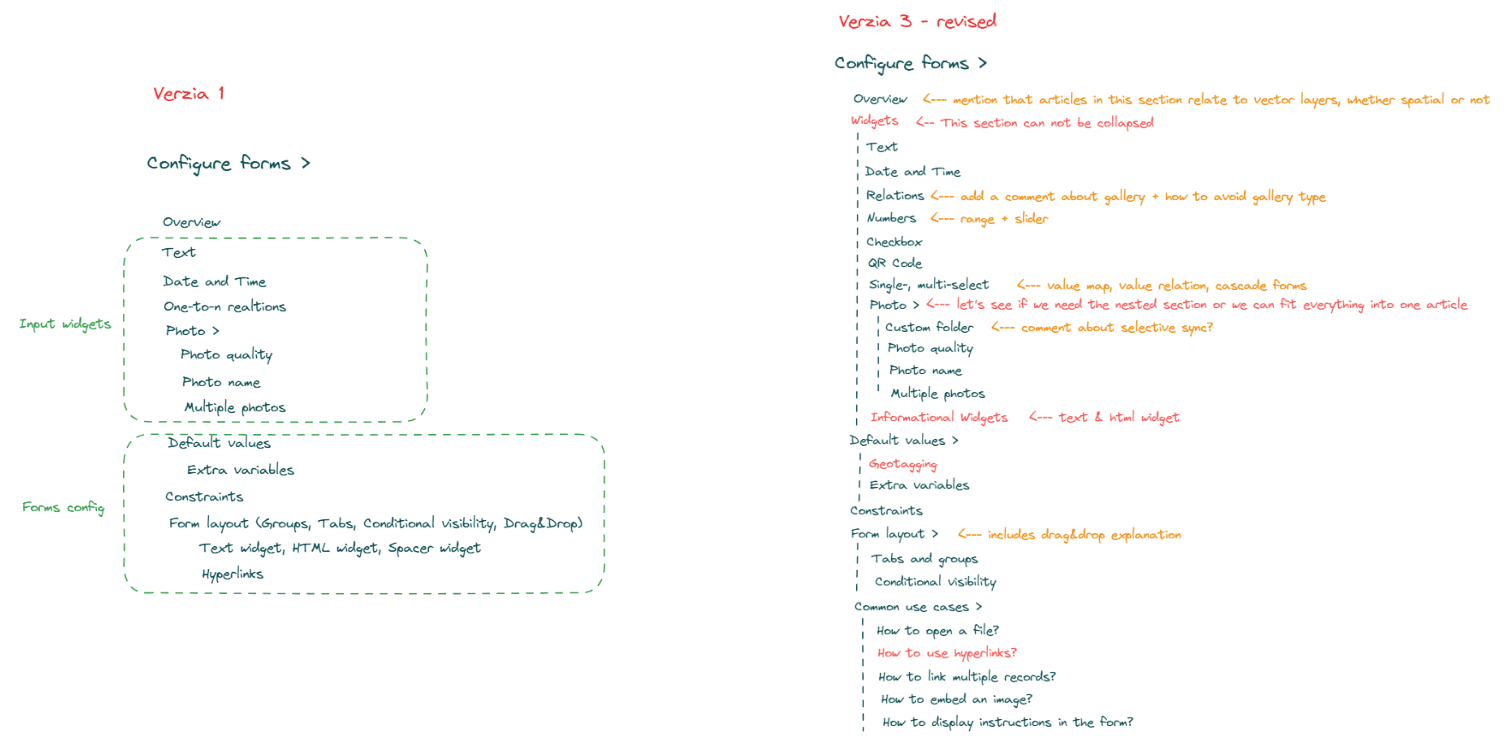
From a simple list to a near-final structure, devs use Excalidraw to plan product documentation.
For the dev team, a quick, collaborative workspace also comes in handy when they need to visualize processes or software architecture. "At one point, we wanted to restructure our database, which required shuffling multiple different tables around. Our dev leaders sketched it all in Excalidraw to find the best way to do it," explains Tomaš.
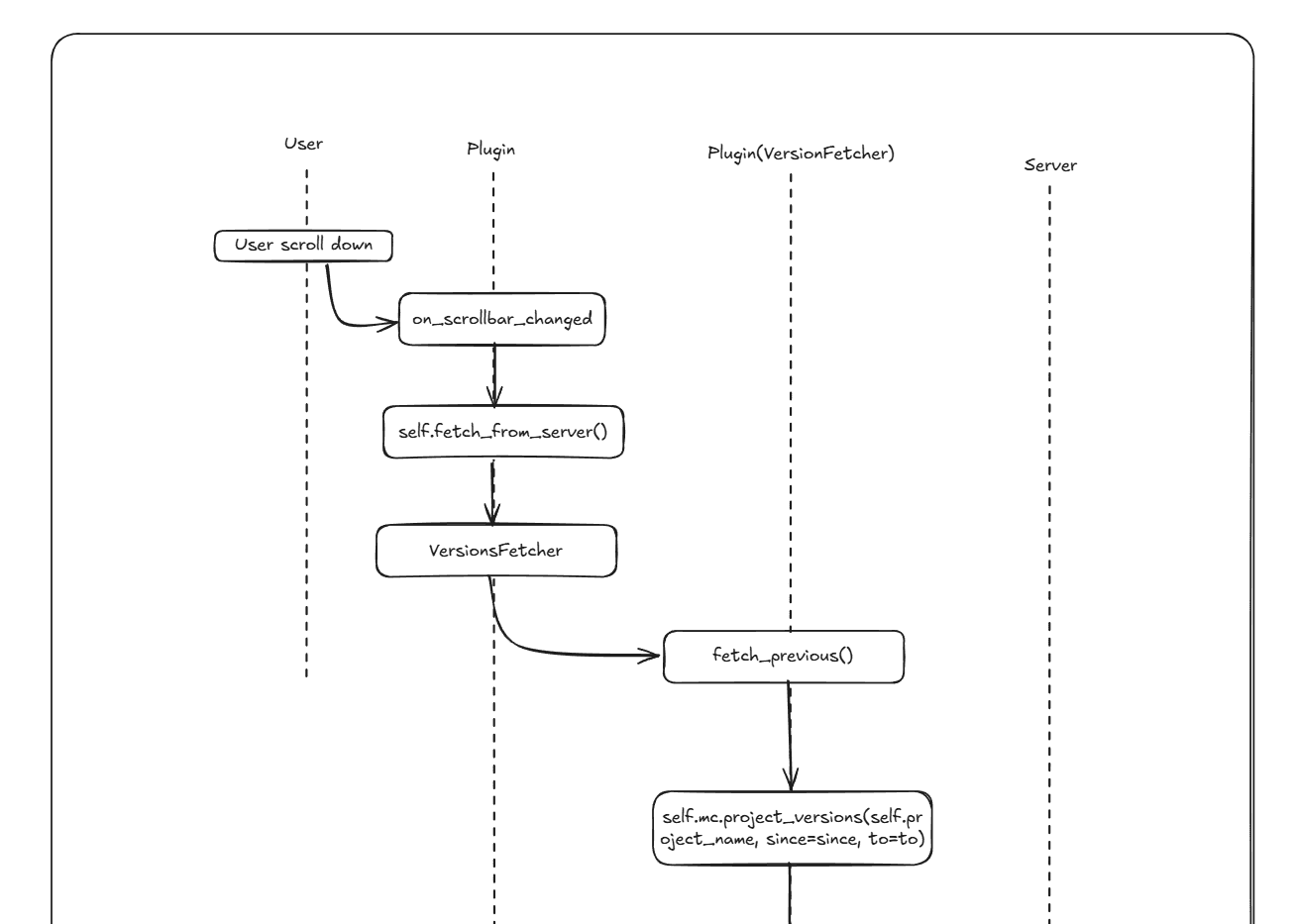
Sequence diagrams capture the interaction logic behind features like versioning.
Managing teamwork
Beyond production, the team takes advantage of online whiteboards to communicate and collaborate in a single, easy-to-share space.
"We use Excalidraw later on as well, like when I want to explain the architecture of our mobile app or how our synchronization system works. We also use it to manage work, like mapping goals for the next year," explains Tomaš.
Versioning has also become easier with Excalidraw. The team doesn't have to rely on a patchwork of tools, because all key product information is now available in one location.
"Excalidraw helps us with documentation, to keep things up to date. If we change something, we can easily make updates to our shared document," he says.
For Tomaš in particular, Excalidraw is a key part of the toolbox. "As a product manager, I use it almost every day," he admits. Visuals help him communicate efficiently across different teams, which is an essential task in his day-to-day work.
"I mostly sketch prototypes to visualize my ideas about different features or how things should work. These drawings often end up either in developer tickets or as an assignment for our graphic designer," he adds.
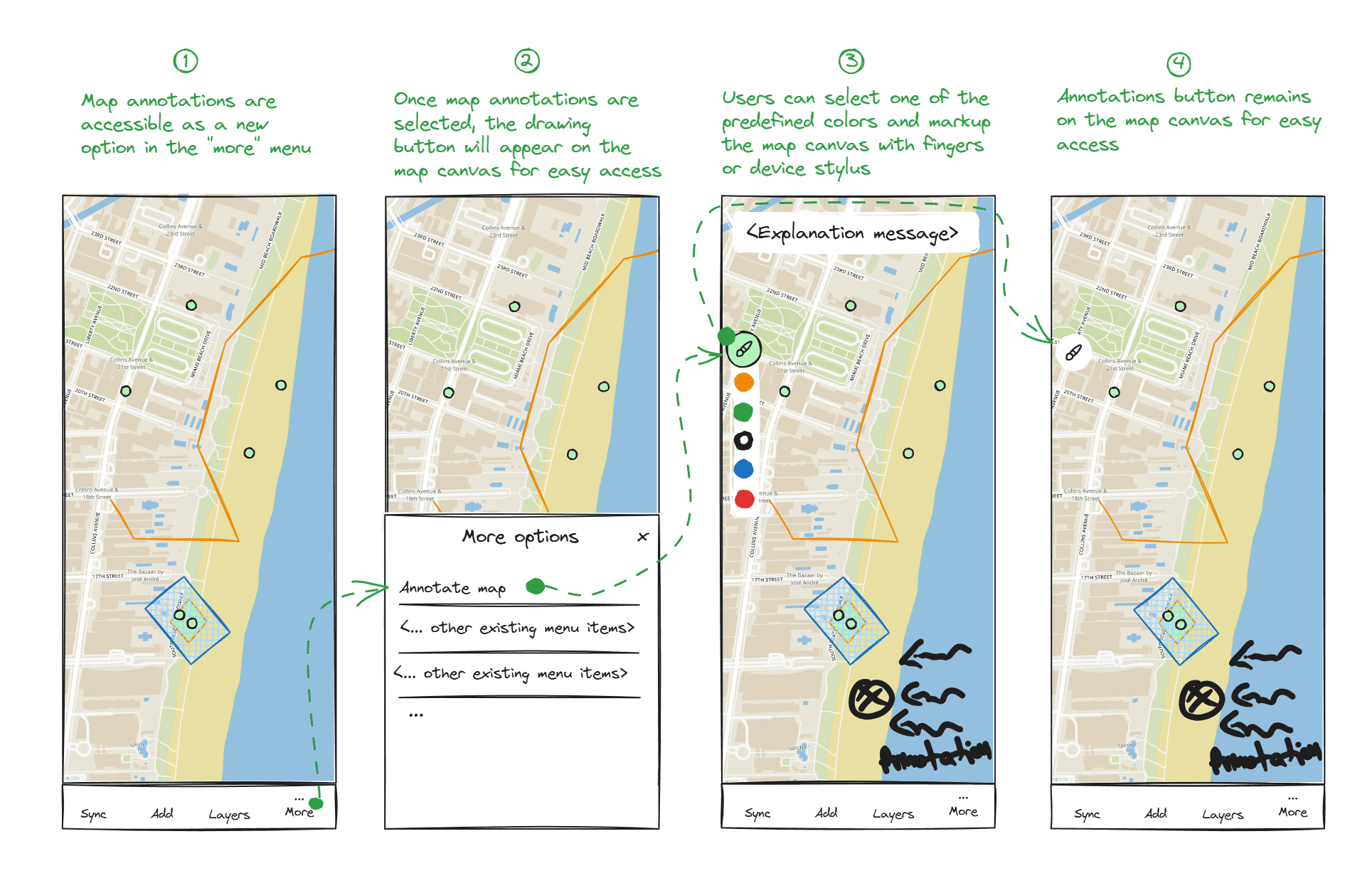
A combination of wireframes and comments helps explain features like map annotation quickly and clearly.
Result
Smooth collaboration across all stages
"Excalidraw helps us communicate and share ideas visually, which is so much easier. It really speeds up our teamwork."
Tomaš Mizera
Developers, designers, managers − Excalidraw enables everyone at Mergin Maps to participate and work together in a single location.
✏️ Quick sketching: Whenever the team needs to share an idea, draw a diagram, or prototype a new feature, Excalidraw is the fastest option.
🔃 Iterative approach: The simple editor helps experiment freely and gradually refine ideas through fast wireframing.
💬 Easier communication: A drawing communicates most ideas more clearly than a lengthy description − and takes a fraction of the time to create.
💎 Clarity across teams: Visuals make complex ideas easy to understand, helping product, design, and engineering stay on the same page.
🗃️ Centralized workspace: Prototypes, diagrams, and notes are stored in a single online whiteboard, easily accessible to anyone who needs them.
Your turn to draw
Take visual notes, map product plans, build software structures, and bounce ideas for faster collaboration and clarity. With a simple layout, hand-drawn feel, and essential features, everyone can jump in and contribute right away.
Give it a try in our free open-source editor, or sign up for a 14-day Excalidraw Plus trial to turn drawings into presentations, add comments, manage your team space, create with extended AI, and explore more teamwork features.


