

Looking for Microsoft Whiteboard alternatives? Here's why Excalidraw is worth a try
- Published November 24, 2026
- by Ziemek Waszczyszyn
Key takeaways
- Microsoft retired the standalone Whiteboard apps and Whiteboard for personal accounts on October 16, 2026. Work and school accounts can still use Whiteboard in Teams and on the web.
- Excalidraw is a free, open-source online whiteboard. It runs in any browser, works offline after the first visit, and doesn't need an account or a download to draw, share, or join a board.
- Excalidraw+ adds cloud storage, Presentations, Comments, Voice Hangouts, and more for $6/user per month billed yearly. Students and teachers get a discount.
Microsoft Whiteboard is still around, just not for everyone. If you use it through a work or school account, it's still there in Teams and on the web. But if you used it with a personal account or in the app, you need a new tool to draw with – like Excalidraw.
Read on to see how the two compare, what you get with Excalidraw, and how to move over.
Microsoft Whiteboard vs Excalidraw at a glance
- Price: Microsoft Whiteboard is included with Microsoft 365 work and school plans. Excalidraw is free. Excalidraw+ costs $6/user per month billed yearly ($7 monthly), with a discount for educators.
- Account: Whiteboard needs a Microsoft work or school account. Excalidraw needs none. Excalidraw+ needs one for cloud storage and Plus features, but guests can join Plus scenes without an account.
- Where it runs: Whiteboard runs in Teams and on the web. Excalidraw runs in any browser and can be installed like an app.
- Real-time collaboration: Whiteboard works with Microsoft accounts only. In Excalidraw, you share a link, and others join without signing up. Excalidraw+ adds access controls and view or edit links.
- Export: Whiteboard exports images (PNG, SVG). Excalidraw exports PNG, SVG, and editable Excalidraw files. Excalidraw+ adds PDF and PowerPoint export for presentations.
- AI: Whiteboard has Copilot with a paid Microsoft 365 Copilot license. Excalidraw includes 10 AI requests a day. Excalidraw+ raises that to 100 or lets you use your own key.
- Diagrams from text: Whiteboard doesn't offer this. Excalidraw has Text to Diagram and Mermaid to Excalidraw on both plans.
- Presentations, Comments, Voice Hangouts, and screen sharing: Whiteboard relies on Teams for these. Excalidraw+ has all four built in. The free plan doesn't include them.
- Integrations: Whiteboard connects to Microsoft 365 and OneDrive. Excalidraw works with Notion, Obsidian, and more through open-source integrations. Excalidraw+ adds developer tools (MCP and API).
- Open source: Whiteboard isn't open source. Excalidraw is, and Excalidraw+ is built on the open-source editor.
- Security: Whiteboard stores boards in OneDrive with Microsoft 365 security and compliance controls, encrypted in transit and at rest. Excalidraw's live collaboration is end-to-end encrypted, and scenes stay in your browser. Excalidraw+ adds AES-256 encryption at rest, TLS in transit, SOC 2 Type 2, and role-based access control.
What happened to Microsoft Whiteboard?
A few months ago, Microsoft Whiteboard users were greeted by a grim message: Whiteboard for personal accounts was being retired on October 16, 2026. On that day, Microsoft discontinued the standalone Whiteboard apps for Windows, iOS, and Android, ended Whiteboard for personal Microsoft accounts (Outlook.com, Hotmail, Live, and Microsoft 365 Personal and Family), and deleted older boards that hadn't been moved to OneDrive.
The legacy Whiteboard service also shuts down on November 30, 2026. You can read all the details on Microsoft's retirement page.
Whiteboard isn't gone for everyone, though. Work and school accounts can still use it on the web and in Teams. If that's you and Whiteboard does what you need, you can keep using it (but we'll still try to convince you to switch).
The change mostly affects people who used Whiteboard with a personal account, such as independent tutors and teachers at schools that don't use Microsoft 365, and anyone who worked with people outside their organization.
Why try Excalidraw
Excalidraw is an online whiteboard with a hand-drawn look that puts simplicity first. We want it to pack a punch without overwhelming you with excessive features.
Here are the top reasons that make Excalidraw a strong Microsoft Whiteboard alternative. Most are free, but we've also included some Excalidraw+ features that come in handy.
1. Free and open, no account needed
To start, open excalidraw.com and draw. To work with others, share a link. No one needs to sign up or log in to join, so setting up teamwork takes less than a minute.
There's also nothing to download. Your work saves in your browser (or as a file on your computer), so once Excalidraw is open, it keeps working without internet. You only need a connection to open it the first time and to collaborate. Prefer an app? Install it from your browser in a few clicks (steps below). It works on Windows, Mac, Linux, Chromebook, and iPad.
Excalidraw is open source: its code is public and free to use, so the tool doesn't depend on one company's plans. If your school or company prefers to keep things in-house, its IT team can even run its own copy.
Others can join your whiteboard through a link or QR code. No sign-up required.
2. Simple from the first click
Excalidraw has one small toolbar and very few menus. If you've ever used Microsoft Paint, Excalidraw will feel familiar right away, whether you're a developer, a student, a teacher, or not technical at all. Pair that with the straightforward setup, and you get a teamwork space that's easy to pick up for creators and collaborators.
The hand-drawn style takes the pressure off: nothing has to look neat (but it can), which suits quick sketches and drawing with a tablet and pen. Need common shapes or icons? Drag them onto a board from Excalidraw Libraries instead of drawing them by hand.
3. Full control over your files
Save your board as an Excalidraw file to reopen it and keep editing later. It's an editable file, not just a static picture (but if you need one, export it as a PNG or SVG image). Keep the files wherever you like, including a OneDrive folder that syncs to your computer.
On the free plan, your scenes stay in your browser, and live collaboration is end-to-end encrypted.
With Excalidraw+, you also get cloud storage, unlimited scenes and folders, control over who can view or edit, PDF and PowerPoint export for presentations, and read-only links and embeds.
4. Built for diagrams, with extra teamwork features
Excalidraw is at its best with diagrams. You get a wide range of arrows and arrowheads, plus sticky notes and video embeds for brainstorming and lessons.
With Excalidraw+, you get Presentations you control from your phone, Comments, and Voice Hangouts with screen sharing.
5. AI and integrations when you need them
Excalidraw comes with AI features, but doesn't force them on you. And we never use your drawings for AI training.
On the free plan, you get 10 AI requests a day to turn a short text prompt into a diagram with Text to Diagram. If you already write diagrams as text in Mermaid, Mermaid to Excalidraw turns them into editable drawings as often as you like. Excalidraw+ raises the AI limit to 100 requests a day, or lets you use your own AI key.
Excalidraw works with Notion and Obsidian on the free plan, and the community has built more integrations, such as one for VS Code. And if you want to take it a step further, Excalidraw+ includes an MCP server and REST API, so Claude, ChatGPT, and other AI assistants can create diagrams, flowcharts, and mind maps directly on your whiteboard. You decide how much AI helps, and where.
Excalidraw for teachers
If you taught with Whiteboard on a personal account, or your school isn't on Microsoft 365, Excalidraw covers the basics without the admin:
- Students don't need to log in. They join from a link, so there are no accounts to create or passwords to reset, and the lesson starts in a minute.
- It's private by default. Live collaboration is end-to-end encrypted on the free plan, and Excalidraw+ is SOC 2 Type 2 compliant.
- It's a good fit for STEM. Draw flowcharts, UML, and other diagrams by hand, write them in Mermaid, use the Excalidraw CLI, or generate them with Text to Diagram. Libraries give you ready-made shapes for different subjects.
- Whole lesson on a whiteboard. Excalidraw+ adds screen sharing, Comments, Presentations, and Voice Hangouts, so students stay focused on the lesson, not on switching between tools.
We offer an educational discount to help you join universities and schools around the world that use Excalidraw+ to teach and study. Simply use an educational email address at checkout to sign up for $3/month with yearly billing or $4/month with monthly billing. Learn more about the education discount.
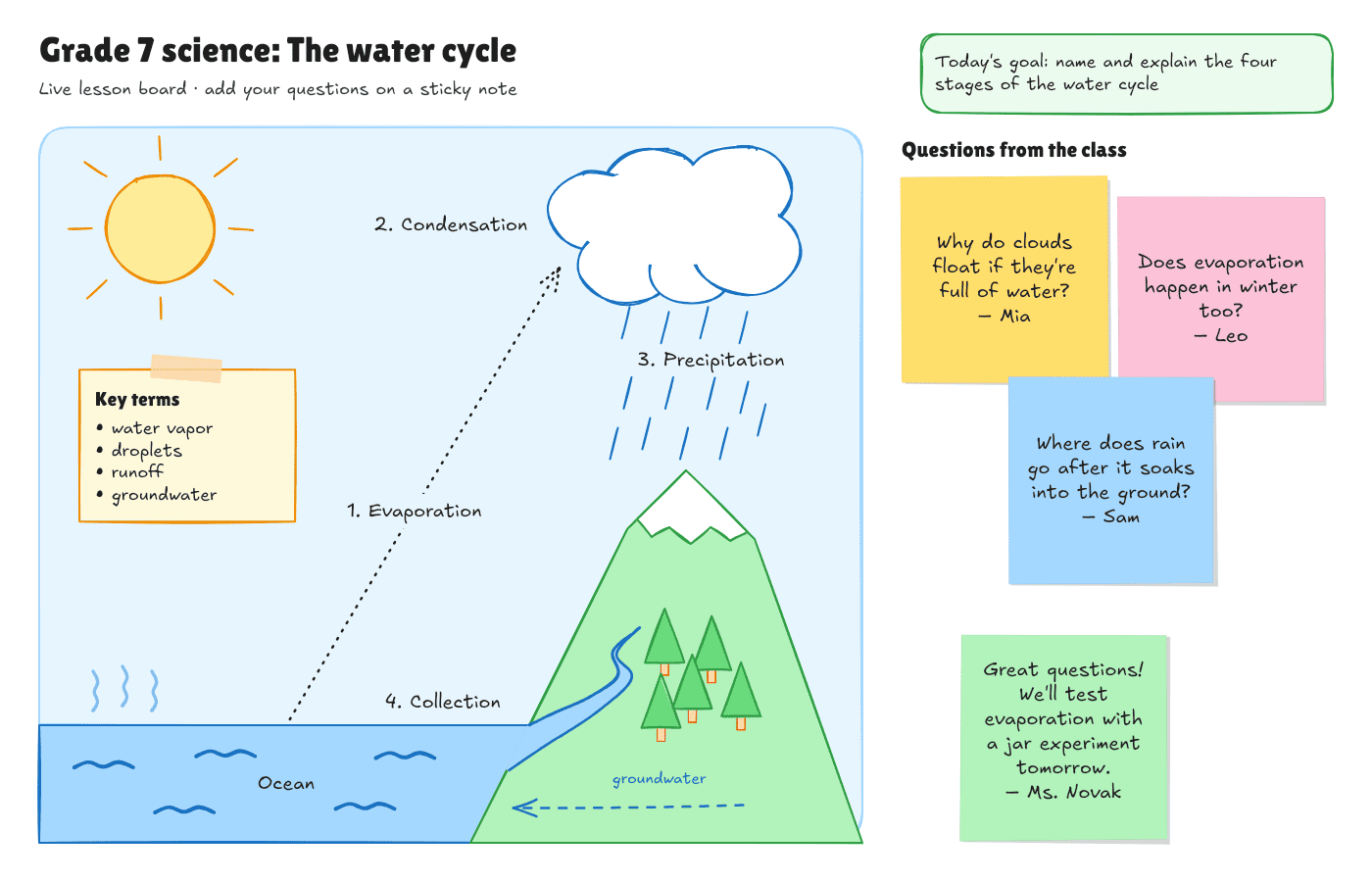
The free online whiteboard comes with all the essentials for online teaching: sharing, collaboration, and sticky notes.
Where Microsoft Whiteboard is still better
Excalidraw is simple on purpose, and that comes with a few trade-offs:
- Microsoft 365. Whiteboard is built into Teams and OneDrive. Excalidraw doesn't integrate with either, though you can save Excalidraw files to a synced OneDrive folder.
- Pen-first work. Whiteboard tidies up handwriting and turns rough strokes into clean shapes. Excalidraw has freehand drawing and supports tablets and styluses, but it keeps your handwriting as it is.
- Teams assignments. In Teams, teachers can hand out a whiteboard as an assignment, so each student works on their own copy and turns it in for grading. Excalidraw doesn't have assignment or grading tools.
How to install Excalidraw as an app
If you don't want to use Excalidraw in a browser, install it as an app (a progressive web app, or PWA). It takes a few clicks and works in Chrome, Edge, and Safari.
- Open excalidraw.com in your browser.
- Depending on your browser, look for an install icon in the address bar or in the browser menu.
- Click "Install" (in Safari: "Add to Dock" on a Mac or "Add to Home Screen" on iPad) to add Excalidraw to your apps.
Installing Excalidraw from the browser takes a few seconds, and even fewer clicks.
How your work is saved
The app saves your work automatically on your device, just like Excalidraw in the browser. Your work stays on that device: it doesn't sync to your other devices, and clearing your browser data deletes it. The free version also keeps one board at a time, so save the current board as an Excalidraw file before you start a new one.
The same file is how you keep a backup or move your work to another computer: save it, then open it there. With Excalidraw+, your boards are saved in the cloud and available on any device.
How to switch from Microsoft Whiteboard to Excalidraw
There's no direct import. Whiteboard only ever exported boards as images, so moving over means rebuilding what you need. Here's the quickest way:
- Gather your exports. Personal-account boards were deleted on October 16, so collect any PNG or SVG files you saved before then.
- Open excalidraw.com. No sign-up needed.
- Drop in an exported image as a reference, and lock it so it doesn't move.
- Rebuild on top of it. Draw over the image, or recreate diagrams from text with Mermaid to Excalidraw or Text to Diagram.
- Save your work as an Excalidraw file, or in Excalidraw+ if you want it in the cloud.
- Invite others by sharing a link.
Start drawing
We know that switching from a tool you've been using for years is never easy. That's one of the reasons why we like to keep Excalidraw simple.
Try it yourself: open excalidraw.com (or jump right into Excalidraw+ with a free 14-day trial), have a look around the editor, and find out if it's a fitting Microsoft Whiteboard replacement for you.
FAQ
Is Microsoft Whiteboard discontinued?
Partly. On October 16, 2026, Microsoft retired the standalone apps and Whiteboard for personal accounts. Work and school accounts can still use it in Teams and on the web.
Can I import my Microsoft Whiteboard boards into Excalidraw?
Not directly. Whiteboard only exports boards as images: drop them into Excalidraw as a reference and rebuild on top.
Is Excalidraw free?
Yes, the full editor is free. Excalidraw+ costs $6 per user per month, billed yearly, and adds cloud saving, Presentations, and collaboration tools. Students and teachers with an educational email get Excalidraw+ for $3/month (billed yearly) or $4/month.
Do I qualify for the educator discount?
We check your email automatically at checkout to confirm that you're a member of an educational institution eligible for the discount. If you still see the regular price at checkout, fill out the verification form on the education page to confirm your status. Learn more about Excalidraw for education.
Do collaborators need an account?
No. Share a link, and anyone can join a live session without signing up, no matter if the whiteboard was created with the free or paid version.
Does Excalidraw work on iPad or with a stylus?
Yes, Excalidraw works with tablets and styluses.
Is there a desktop app, and does it work offline?
You can use Excalidraw in your browser, or install it from the browser like an app. After the first visit, it keeps working offline; you need internet to collaborate.
